When I was in high school, I had a history teacher, Mr. Allison, who kept track of our participation in class discussions on a seating chart. When we contributed something to the conversation, he made a mark next to our name; those marks added up to a grade. It motivated us to participate, especially at the end of the grading period!
When I first started teaching reading, my mother, an elementary school teacher, showed me how she kept anecdotal records about her students. She used checklists, sticky notes, and file folders to document observations and keep track of student progress. It was valuable information, but collecting and organizing it took time—and she wasn’t juggling six classes.
I wanted something in between. Mr. Allison’s seating chart was quick and easy, but I needed to track more than participation. My mother’s approach captured all kinds of information, but I needed something simpler. I wanted a way to document what was happening in my classroom, but the process shouldn’t take more time and attention than the teaching itself.
I knew a seating chart could be the solution, but I could never quite make it work for everything I was trying to do. I tried graph paper, drawing large boxes for seats with rows of smaller boxes underneath for symbols and codes. It worked, but making changes was time-consuming.
A few years ago, I came across a seating chart template online. I don’t remember where I found it, but I adapted the idea into a system that has become one of my favorite classroom organizational tools.
It’s nothing fancy. Just a Google Sheet, a few basic formulas, and a piece of paper
One Page, Five Days, Lots of Possibilities
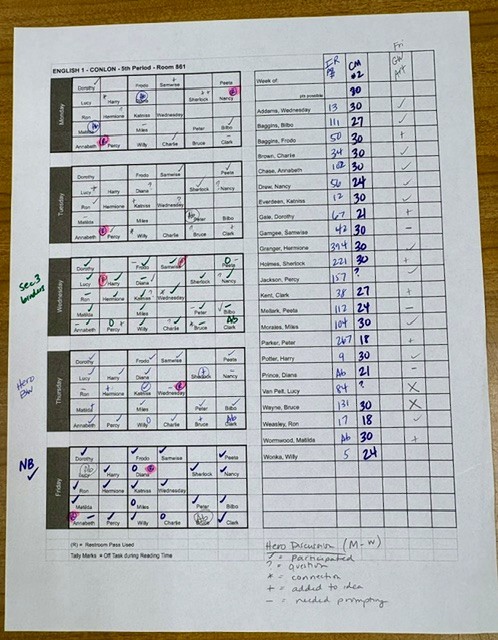
I created my seating chart in Google Sheets. It includes a diagram of the classroom for each day, Monday through Friday. I enter the students’ names in the first chart, and simple formulas automatically populate the other four. If I change the seating arrangement, I only have to update it once. Each class has its own tab.
Alongside the seating charts is a roster with several blank columns I use to record grades, assignment completion, reading progress, or anything else I need to track that week.
I print the full workbook on Friday afternoons (for the coming week). That’s it.
What Am I Tracking? It Depends on the Day.
Some days, I just need to know whether students have what they’re supposed to have. Do they have their independent reading books? Did they bring their binders? Other days, I’m looking for evidence of learning. Maybe students are supposed to write a summary sentence after reading a section of text.
Depending on what I’m tracking, I might call roll and record the information in the roster columns, or walk around the room, glance at students’ notebooks, and make a quick mark on the seating chart. I may never enter those checks into the gradebook. But students know I’m checking, and that little bit of accountability can make a difference.
The chart is especially useful for tracking student talk.
I believe some of the most important learning happens when students talk to one another. They ask questions, make connections, clarify their thinking, and build on one another’s ideas. But it can be difficult to remember who contributed what, especially when a discussion or learning activity stretches across several days.
Sometimes I’ll ask students to contribute a question or make a connection during our work on a particular topic. They might have three days to do it. When a student makes that contribution, I mark it on the chart for that day (using codes/shorthand as appropriate).
Now I have a record of participation over time, rather than relying on my memory of who spoke most recently—or most often.
And because I’m recording contributions as they happen, I can be more consistent when I need to evaluate participation.
Sometimes the Small Things Matter, Too
The seating chart isn’t limited to academic work.
For example, students are supposed to sign in and out for restroom passes through our online learning management system. In addition, I try to mark an R on the seating chart. That way, I can see at a glance if a student has used the pass several days in a row without pulling up a report on the computer.
The same goes for classroom management observations, missing materials, and anything else I want to remember.
I don’t need a separate tracking system for every little thing that happens in my classroom. I just need a convenient place to make a note.
A Record of What Really Happened
At the end of the week, I transfer any grades or other information that needs to be entered into the school’s online systems. Then I put the seating charts in a binder with all the previous weeks’ charts. This binder is a record of what actually happened in class.
If I need to double-check a grade I entered, I can go back to the original sheet. If a question comes up during a parent conference, I have documentation to refer to. And if I want to look back at a student’s participation or work habits over time, the information is there.
It’s not a complicated data collection process. It’s simply a way to capture the everyday details that are so easy to forget.
Make It Work for You
One of the things I like most about this system is its flexibility.
The marks don’t have to mean the same thing every day. A checkmark on Monday might mean a student contributed to a discussion. On Tuesday, it might mean the student completed a reading assignment. On Wednesday, I might be checking for a summary sentence in a notebook.
To be honest, there are weeks when I have no idea what Tuesday’s checkmarks meant! That’s why I try to jot a few notes in the margins to remind myself what I’m tracking and why.
You could use this system to document formative assessments, reading progress, participation, assignment completion, or classroom observations. You could adapt the seating arrangement, change the tracking columns, or develop your own shorthand.
And you certainly don’t need to record everything. The point is to make it easier to notice and remember what matters.
Try It Yourself
I’ve shared my weekly seating chart template for anyone who would like to try it. The first tab includes instructions for customizing the chart for your needs.
[Click Here to Get Your Own Copy of the Weekly Seating Chart]
Click the link above and select “Make a copy” to save an editable version to your own Google Drive.
See how it works for you, and make adjustments as you go.
Good classroom systems don’t have to be elaborate. Sometimes a piece of paper, thoughtfully designed and consistently used, can make teaching a little easier—and help us pay closer attention to the learning happening right in front of us.


Leave a Reply